Articles:
Replace every plank if you must — but NEVER touch the keel.
A 30-Year Playbook for Migrating Legacy Software.
The Sign in the Window
Cautionary advice for the software industry, and prospective software engineers.
Technical Debt Always Comes Due
Red Pill or Blue Pill? Your Legacy System Won't Wait for You to Decide
Hybrid Intelligence: Why AI Fails Without Human Psychological Architecture - article link and summary.
Replace every plank if you must—but NEVER touch the keel.
A 30-Year Playbook for Migrating Legacy Software
By Dean L.Reyburn, VP/CTO Reyburn Engineering, Inc.

The Codebase of Theseus*
In 1995, I wrote a professional application called CyberTuner for Mac Classic. That same application — same core algorithms, same business logic (with improvements along the way) — still runs today on modern iOS devices, serving thousands of professionals worldwide.
It has survived: Mac Classic → Windows → Mac OS X → Windows Mobile → iOS. Four platform transitions. Five platforms. Thirty years.
Most software doesn’t survive one platform transition, let alone four. Here’s how we did it — and why the conventional wisdom (rewrite from scratch) would have killed the application years ago.
The Joel Spolsky Problem
If you’re a software engineer tasked with maintaining or porting an older codebase, you should run, not walk, to Joel Spolsky’s famous 2000 article “Things You Should Never Do, Part I.”
Spolsky wrote that rewriting from scratch is “the single worst strategic mistake that any software company can make.” He was right. But he didn’t tell you what to do instead.
I’ve spent 30 years solving that problem. But not everyone figures it out in time.
The Cost of Ignoring Legacy Systems
In December 2022, Southwest Airlines provided an $825 million lesson in what happens when you don’t maintain legacy systems. Their crew scheduling software — built in the 1990s and starved of investment for decades — collapsed under a winter storm that other airlines handled routinely. The system couldn’t match pilots and flight attendants to planes, forcing dispatchers to coordinate manually by phone. Southwest canceled 16,900 flights in ten days, stranded over 2 million passengers, and became a national punchline.
The cruel irony: their pilots’ union had warned a month earlier that they were “one thunderstorm away from a complete meltdown.” The flight attendants’ union had prioritized IT upgrades over pay raises. Management knew. They just didn’t act.
Whatever Southwest would have spent to modernize that scheduling system — $10 million? $50 million? — it would have been a rounding error compared to the $825 million they lost in a single week, plus the incalculable damage to their reputation.
Legacy systems don’t care about your budget constraints. They fail on their own schedule, usually at the worst possible moment. The question isn’t whether you can afford to modernize — it’s whether you can afford not to.
Why Rewriting Fails
“The old code is messy. Let’s rewrite it cleanly with modern best practices and a fresh start.”
I’ve heard this pitch many times. From my own team. From consultants. From well-meaning developers who just want to write “good” code. It sounds reasonable. It feels like progress. It’s a trap.
Here’s what you lose in a rewrite.
· Decades of bug fixes — every strange-looking line of code probably fixes a real corner case you don’t remember anymore.
· Edge cases nobody can reconstruct — that “unnecessary” bounds check prevents a crash from corrupted data. It still happens.
· Domain expertise encoded in algorithms — that strange-looking calculation compensates for a real-world quirk that took years of empirical testing to discover.
· Institutional knowledge that simply evaporates — you think you understand what the code does, but you don’t. Not all the subtle behaviors that users depend on.
From my own codebase: there’s a validation check that the UI already enforces. Redundant? In 2001, a corrupted preferences file bypassed the UI and the app crashed spectacularly. The validation stays. There’s a signal processing algorithm that runs slower than modern libraries. But it produces bit-identical results to the 1996 version. Users have built decades of saved data trusting those results. Changing the algorithm, even to make it “better,” would break that trust.
Every application that’s been in production for years has hundreds of these. A rewrite loses them all.
The “mess” is actually accumulated wisdom. The code has been shaped by reality — by actual users, by real-world problems, by years of “oh, we need to handle this case too.” You’d be trading tested code for untested code. And 6–12 months later, the new code will be just as “messy,” because the mess is inherent in the problem domain, not in the developers.
What to Preserve: The 80/20 Rule
After 30 years of porting, I’ve learned this: 80% of your code’s value lives in 20% of the codebase. That 20% is the business logic — algorithms, calculations, domain-specific functionality. The other 80% is UI and platform glue, and it can and should change.
Think of your application in three layers:
UI (20% of value) ← REWRITE THIS
Platform-specific, dated
UI should look modern. Native to each platform. Users expect current interfaces. Don’t try to make a Windows menu bar work on a touch device.
Business Logic (80% of value) ← PRESERVE THIS
Decades of refinement
Business logic should be untouched. This is your proven, debugged, field-tested code. This is where decades of refinement live. This is what users trust.
Platform APIs ← ISOLATE/TRANSLATE (ABSTRACT) THIS
The platform layer needs isolation and translation (AKA abstraction). File I/O, graphics, sound, networking — these need translation layers between your business logic and the native OS APIs. Every operating system offers these services; only the APIs differ.
In my original application, the business logic was roughly 20,000 lines of C. The UI and code talking to the APIs was roughly 80,000 lines. But the value ratio is inverted. That small core is where the domain expertise, the algorithms, and the years of refinement live. Everything else is a delivery mechanism. Of course, there are many more lines now because systems are more complex, but the 80/20 rule still holds true.
The Methodology
Over 30 years and 5 platforms, I’ve refined this approach into repeatable steps.
Step 1: Assess and Separate. Before touching the new platform, work in the OLD environment while it still compiles. Pull business logic out of UI code. Every calculation, every validation, every domain rule should be callable through a clean function interface. This feels like you’re not making progress on the port. You’re making the actual port 10X easier.
Step 2: Design the New Interface. Build the UI on the new platform. It doesn’t have to do anything yet — wire it to dummy functions that return fake data. Follow platform conventions. Use native controls. Users expect a modern interface, and this is your chance to improve the experience while keeping proven logic underneath.
One caution: users migrating from the old platform need to get oriented quickly. Keep major workflow changes to what’s necessary for the new platform’s conventions. Up to about 30% change is manageable. Beyond 50%, you’re requiring significant retraining — and that user familiarity is almost as valuable as your engine’s domain knowledge.
Step 3: Port the Business Engine. If your engine is in a portable language like C, this is mostly mechanical — set up the build system, include the files, fix compiler errors. If you need to translate between languages, use the black-box method: capture thousands of input/output pairs from the old system, translate the code, run the same inputs through the new version, and verify identical outputs. You don’t need to understand every line if you can prove the translation produces the same results.
Step 4: Build the Compatibility Layer. Connect your engine to the new OS. File systems, networking, graphics primitives, and sound I/O exist on every platform — only the APIs differ. Your compatibility layer translates between your engine’s expectations and the new platform’s interfaces. Sometimes one component needs fully native code for performance. Fine — rewrite that part, but keep the business logic above it untouched.
Step 5: Black-Box Validation. Before you ship, prove the new version works identically to the old. Capture hundreds or thousands of real-world test cases — inputs, outputs, file processing results, edge cases, boundary conditions. Run them through the new version. For numerical calculations, do byte-level comparison where possible. Investigate every difference: is it a bug in the port, a harmless platform difference, or an actual improvement? This step is tedious. It’s also the most important.
Step 6: Beta Testing. Line up 20 to 50 beta testers who used the old version. Give them free copies if you have to. Nothing validates a port like real users comparing old behavior to new, and modern platforms will feed you crash reports automatically.
Step 7: Connect and Ship. Wire the new UI to the preserved engine through your clean APIs. If you did Step 1 well, this is straightforward — the UI calls engine functions, the engine returns results, the UI displays them. Neither side knows or cares how the other works. Then polish: performance, UI refinements, documentation. Ship.
Subsequent ports are dramatically faster because you’re reusing the compatibility layer and the engine. On my second, third and fourth platform transitions, the engine ported directly with very little change — only the UI and platform layer needed work.
While my examples come from a specialized domain, this methodology generalizes to any legacy system — financial, logistics, healthcare, defense. If there's valuable business logic trapped inside an aging interface, the approach is the same. The domain doesn't matter. The architecture does.
Common Pitfalls
Inadequate separation. If business logic is tangled with UI code, you end up porting everything. Separate first, port second — even if it takes weeks in the old environment. This work pays off immediately.
Skipping the feedback loop. Your beta testers will find things you never imagined. Don't just collect their feedback — act on it, fix it, and send it back to them. Repeat until they stop finding problems. This cycle is where quality lives.
Making “improvements” during the port. Power users will expect you to improve the engine while your hands are greasy. Resist. Freeze the engine during the port. You won’t be able to distinguish between bugs you introduced by changing the engine and bugs caused by the platform change. Even most “bugs” you discover should be preserved unless they’re crashes — some external process may be expecting that behavior.
Ignoring platform strengths. Don’t make the new version a pixel-perfect replica of the old. Your new platform has capabilities the old one didn’t — touch interfaces, cloud sync, better graphics, notifications. The business logic stays preserved while the experience improves. That’s the whole point.
The Long View — And What Just Changed
Software is expensive to build but even more expensive to rebuild. The accumulated wisdom in working code — the edge cases, the bug fixes, the domain expertise — is irreplaceable.
When platforms change (and they always do), the temptation is to start fresh. To use the new shiny framework. To write “clean” code.
Resist that temptation.
Most of the apps that were around 30 years ago have disappeared — probably 99% are gone. They rewrote, introduced bugs, lost customers, and eventually failed. Their software died with the platforms it was built for. And the ones that didn’t rewrite? Many became Southwest Airlines — ignoring the warnings, starving the systems of investment, waiting for the storm that would expose what they already knew was fragile.
There’s a third path:
Preserve what works. Modernize what the user sees. Isolate and translate what’s platform-specific.
Joel Spolsky told you what not to do. This article is what to do instead.
But I need to tell you what happened next,because it changes the calculus of everything I just described.
Shortly after writing this article, I put the methodology to the test one more time — the most ambitious modernization my application has ever undergone. In roughly three months, working as a single senior developer with AI-assisted development tools, I completed all of the following:
• Replaced a decade-old cryptographic security library with its modern successor
• Rebuilt the entire graphics rendering pipeline on a current framework
• Internationalized over 700 interface files, preparing the application for release in 23 languages
• Constructed a complete cloud synchronization system with conflict resolution and merge handling
• Built a domain-specific AI support assistant, trained and validated to 97% accuracy
• Updated every interface component to current platform standards
Any one of these would have been three to six months of work under previous methods. Together, they represent what I’d estimate as two to three years of traditional development effort.
The methodology in this article didn’t change. The separation of business logic from UI, the compatibility layers, the black-box validation — all of that still applies, exactly as described. What changed is the speed at which an experienced engineer can execute each step. The tedious, mechanical parts of porting — syntax translation, API migration, interface file generation — are precisely the tasks that AI tools accelerate most dramatically.
Here’s what this means for your legacy system: the project that was quoted at two years and $4 million three years ago? The methodology is the same, but the economics are different now. Modernization efforts that were previously impossible for small teams are suddenly feasible. Software that wasn’t worth porting is now worth porting. Systems that were too expensive to internationalize can reach global markets.
The playbook hasn’t changed. The speed of execution has.
CyberTuner is still here. Still growing. Still competitive. Not because the code is “clean” or “modern,” but because the core logic works — and in thirty years, I never threw that away. I just got a lot faster at everything around it.
About the Author
Dean Reyburn is co-founder of Reyburn Engineering, Inc. and creator of CyberTuner, a professional piano tuning application that has survived Mac Classic → Windows → Mac OS X → Windows Mobile → iOS — five operating systems over thirty years. Reyburn Engineering specializes in legacy application modernization. Dean holds four U.S. patents in piano technology.
* The Ship of Theseus is an ancient Greek thought experiment: if you replace every plank in a ship one at a time, is it still the same ship? Philosophers have debated this for 2,500 years. Software engineers face the same question every time they maintain a legacy codebase. Our answer: yes — as long as you preserve what makes it the ship!
The Sign in the Window
A message to every 18-year-old considering a software engineering degree
By Dean L.Reyburn, VP/CTO Reyburn Engineering, Inc.
A young man recently emailed me asking for career advice. His father was a student in a technical class I taught.
recently, and he's about to enroll in college as a computer science major. He wanted to know where to start.
I answered him honestly. I'm not sure everyone in my position would have.
I've been writing software for 44 years. I'm self-taught. My company has AI systems in production. I use AI tools every single day, and I can complete a week of work in a day or two because of them. I am living proof that software engineering is still a powerful and rewarding field.
And I'm telling you; think very carefully before going into debt to get a four-year software engineering degree.
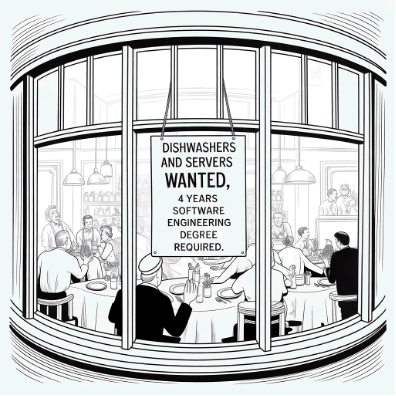
The Sign in the Window
Picture a sign hanging in a restaurant window, slightly updated from the Depression-era photographs you've seen in history books:
"Dishwashers and servers wanted. Four-year software engineering required."
It's darkly funny. It's also not far from where things are heading.
Here are some numbers that should be part of every college advising conversation in America right now, but aren't:
Software engineering job postings are currently at 65% of their 2020 levels — a five-year low, and falling faster than any comparable field.
Employment for software developers ages 22–25 has fallen nearly 20% since ChatGPT's public release in late 2022.
Big Tech companies now fill just 7% of new hires from recent graduates — down 25% in a single year.
In the San Francisco Bay Area, more than 80% of "entry-level" job postings require at least two years of experience.
A Stanford study found that in 2023, AI could solve 4.4% of software engineering benchmark problems. By 2024: over 70%.
That last number is not a typo. Nobody knows where that line stops climbing. I don't, and I build AI systems for a living.
To be clear: not all four-year degrees carry the same risk. Electrical, mechanical, civil, and network engineering are a different story entirely. These fields require engineers to make decisions rooted in physical reality — load-bearing calculations, power grid design, semiconductor fabrication, infrastructure architecture — where AI can assist but cannot sign off. Liability, safety codes, and the irreducible complexity of the physical world still demand human judgment and human accountability.
The Bureau of Labor Statistics projects engineering occupations as a whole will grow faster than average through 2033, driven by data centers, semiconductor manufacturing, energy production, and grid modernization. The warning in this essay is not "don't get an engineering degree." It is much more specific than that: don't get a degree in a field where AI is actively replacing the entry-level work that used to justify hiring you — and don't go into debt to do it. Software engineering, legal research, financial analysis, marketing, HR — these are the fields where the disruption is sharpest and the entry-level pipeline is collapsing fastest. Hard engineering, skilled trades, and anything requiring licensed accountability in the physical world are a different matter entirely.
The Debt Problem
Here is what keeps me up at night on behalf of young people I've never met.
An 18-year-old today makes a reasonable decision based on what the world looked like five years ago. They take on $50,000 or $100,000 in student loans. They spend four years earning a degree. They graduate into a market that has fundamentally changed while they were studying.
And then they spend the next decade — or longer — in what I can only call slavery to debt. Not because they were foolish. Because nobody told them the truth.
The people who should be giving honest guidance — high school counselors, universities — have biases and financial incentives pointing the wrong direction. Colleges are not going to tell applicants "this field may not need you in four years." That's not to criticize their professionalism; it's just reality. It means the honest guidance has to come from somewhere else.
I'm trying to be the “somewhere else”.
What I Actually Recommend
I have four sons. I funded three of them through college and trade school, debt-free. All four have excellent careers (two are engineers with BS degrees, two in trades) and clean balance sheets. The absence of debt gave them freedom — to take risks, change direction, build something, wait for the right opportunity. Debt takes that freedom away before your adult work life has even started.
This isn't hypothetical advice for me. Twenty years ago, one of my sons started down the software engineering path, discovered it wasn't his calling, and we sent him to North Bennet Street School in Boston — one of the finest piano technology programs in the country. That was the right decision then, when software jobs were plentiful and AI was science fiction. It would be an even easier decision today.
Here is what I told that young man who asked for career advice, and what I'd tell any young person asking me today:
Don't go into debt for a software engineering degree. If you can get scholarships, grants, or the GI Bill, great. But four years from now, the market will be even tighter than it is today. A degree plus $100,000 in debt and no job in your field is a genuinely terrible position to be in.
Consider a skilled trade. This is the advice that sounds like "aiming low" and isn't. Plumbers, electricians, HVAC technicians, carpenters — these fields are booming, pay very well, and are completely immune to AI displacement. The country is screaming for skilled tradespeople. The work can be interesting, the pay is already very good and rising, and over the next decade I believe the economic value of skilled hands will only increase as AI makes the knowledge economy more efficient and more wealthy. The money generated by AI still has to be expressed in the physical world.
Teach yourself to program. I did. Pick a platform and a language, learn the development environment, and build something real. You will learn more in six months of building an actual app than in two years of coursework. The iOS platform, Swift language, and Xcode IDE is one path. There are others.
Learn to use AI as a tool, NOT a crutch. Write code yourself and use AI to review, correct, and teach you. If you let AI write everything, you learn nothing. If you use it the way a craftsman uses a good tool, you'll be far more capable than someone who never learned.
The Bigger Picture (And Why I'm Still Optimistic)
I want to be clear about something, because I don't want this to read as doom and gloom about technology. I believe AI, handled well, can be genuinely good for society. It will generate enormous wealth, reduce costs, solve problems that were previously intractable, and free humans from genuinely tedious work.
But macro optimism and individual hardship can exist at the same time. The Industrial Revolution was unambiguously good for humanity in the long arc. It was also genuinely brutal for the specific people whose livelihoods were disrupted during the transition. That doesn't mean we should have stopped it. It means we should have been honest about it.
Society doesn't pay your student loans. Plan accordingly.
What Happens Next? (A Warning for Companies, Not Just Students).
There is a challenge ahead that companies haven't fully reckoned with yet. The pipeline of experienced software engineers doesn't replenish itself automatically. Senior engineers retire. Institutional knowledge walks out the door with them. And if the entry-level jobs that used to train the next generation have been eliminated — replaced by AI doing the routine work — where do tomorrow's senior engineers come from?
The answer, I believe, is something like the apprenticeship model that every skilled trade has always relied on. Pair younger engineers with experienced ones. Invest in the pipeline deliberately, even when AI makes it tempting not to. Medicine figured this out with residencies. The trades figured it out with journeyman programs. Software engineering skipped that step during the boom years because it didn't have to think about it. It will have to now.
Senior engineers these days, using AI tools such as Claude Code, are feeling like they have superpowers. They can produce software at speeds they never could before, with a quality they could only dream about 5 years ago. Some of that saved time will need to be put into training the next generation.
The future world will still need software engineers — in spades. The question is whether we'll have them when we need them.
A Note on My Vantage Point
I am, somewhat unusually, both a blue-collar worker and a white-collar engineer. I've been a professional piano technician for 49 years. For many years I was a field piano service tuner-tech. I run a workshop that builds acoustic piano keyboards (out of wood no less!). I've also been a software engineer for 44 years, hold four US patents in piano technology, and currently run an AI consulting and engineering company with my son.
I have lived and worked in both worlds. From that vantage point, I can tell you honestly: right now, the safest and most promising path for many young people is toward skilled physical work, not away from it.
The world has inverted. The knowledge economy is being disrupted. The trades are booming. An electrician running their own business — using AI to handle scheduling, invoicing, and research while their hands do irreplaceable physical work — is in a very strong economic position in 2026 and an even stronger one in 2030.
I hope my young aspiring software engineer reads this. I hope a few thousand other young people do too.
If even a handful of them avoid a financial fate I wouldn't wish on anyone, this was worth writing.
For more background, lookup “Mike Rowe – Dirty Jobs”. Mike may as well be a modern day prophet, he has been preaching hands-on physical work as a profession for decades. Mike’s take is incredibly pertinent to where today’s economy is going – and your high paying hands-on job doesn’t have to be “dirty”.
For the financial side of this equation, look up Dave Ramsey. Dave also has been preaching the dangers of debt — and the freedom that comes from avoiding it — for decades. His message that debt is bondage isn't just personal finance advice, it's a life philosophy that applies with particular urgency to the decision every 18-year-old faces today. A degree that doesn't lead to a job, financed by loans that don't disappear, is exactly the trap Dave has been warning about for 30 years. He just didn't know AI would be the one setting it.
Dean Reyburn is co-founder of Reyburn Engineering, Inc. (VOSB/HUBZone certified) and creator of CyberTuner, the world's leading iOS piano tuning application. He has been a Registered Piano Technician (RPT) for 49 years, runs Reyburn Pianoworks, Inc, which builds acoustic piano keyboards, and is a self-taught software engineer for 44 years.

Technical Debt Always Comes Due Red Pill or Blue Pill? Your Legacy System Won't Wait for You to Decide
By Dean L. Reyburn
In December, 2022, Southwest Airlines provided a $825 million lesson in what happens when you don't maintain critical legacy systems. Their crew scheduling software—built in the 1990s and starved of investment for decades—collapsed under a winter storm that other airlines handled routinely. The system couldn't match pilots and flight attendants to planes, forcing dispatchers to coordinate manually by phone. Southwest canceled 16,900 flights in ten days, stranded over 2 million passengers, and became a national punchline.
Does your business / government agency / organization depend on software that was written decades ago and never updated? Maybe a genius employee set up a system that works so well that nobody wants to touch it. That’s great, but with the speed technology changes, sooner or later something will cause that system to need updating. For instance, that old hardware will wear out, or the operating system will fail, or the software will simply become incompatible with modern systems or the internet. When that happens, your organization will be in dire straits and desperate to fix that older system.
Many organizations go years running on a system that was designed so long ago, few if anyone remember who built it, or how to fix it. It’s even possible the source code to the software is lost.
I’ve written about the Southwest story before, and some readers may have even experienced this disaster first hand.
The cruel irony: their pilots' union had warned a month earlier that they were "one thunderstorm away from a complete meltdown." The flight attendants' union had prioritized IT upgrades over pay raises. Management knew. They just didn't act. Whatever Southwest would have spent to modernize that scheduling system—$10 million? $50 million?—it would have been a mere rounding error compared to the $825 million they lost in a single week, plus the incalculable damage to their reputation.
Legacy systems don't care about your budget constraints. They fail on their own schedule, usually at the worst possible moment. The question isn't whether you can afford to modernize—it's whether you can afford not to.
If your organization depends on software written a long time ago, and its mission critical, do you have an engineer responsible for maintaining that system? If so, are your managers listening to his/her pleas for more funding?
My contention is that there is a certain “technical debt” to pay for using technology. That debt has to be paid every year, or at least regularly, otherwise your organization can end up in a Southwest Airlines type situation.
So your managers say “well everything works, why should we shovel money into a system that’s working?”. My answer is, you will pay a small amount now, or a large amount later, your choice. The technology gods will have their due in either case.
This “technical debt” isn’t like a bank debt. It’s a debt that builds up every year if you don’t pay it down. And there are a number of ways to pay it down.
Technical debt pay down methods. You *will* pay the debt with one of these methods, there’s no choice or doubt in the matter.
1. A little at a time, every year, updating and maintaining the software that’s mission critical for your business.
2. Once every few years there’s a technology change and your system starts giving warning signs. This isn’t as optimal as method 1, but better than letting the system go without maintenance long term.
3. Crash and burn. This is the Southwest scenario. You’ll pay 10 or maybe 100 times as much as you would have to maintain the tech. Fixing on an emergency basis is always more expensive, and sometimes an emergency fix may not even be possible.
4. Simply go out of business (product/service, division, or organization). This is certainly a way to pay the technical debt. Nobody owes it anymore. Your business or organization will have lost value for the shareholders or citizens.
Does any of this sound familiar?
· The system that "just works" so nobody dares touch it
· The original developer retired five years ago—or twenty
· Documentation that exists only in someone's head
· Source code on a backup tape nobody's tested
· A language or platform that hasn't been taught in universities for a decade
The specific technology almost doesn't matter. It could be COBOL on an IBM mainframe, Visual Basic 6 running a manufacturing line, a Windows Mobile, iOS or Android app, a Perl script that generates all your invoices, or a FileMaker database that somehow became mission-critical. The pattern is identical.
Banks, manufacturers, government agencies—organizations of every size depend on software written 30 to 50+ years ago. Many still run on mainframes, executing millions of transactions daily in obsolete languages that haven't been taught in decades. So, who will maintain those systems? Within the next decade or two, all the COBOL engineers will be retired or passed on to the great coding jobs in the sky.
The time to fix these systems is now or soon. Why? The stars are aligning with the emergence of real AI (LLM) tools to write and port software, and the optimal window is closing. The AIs still need humans who understand obsolete programming languages and the intent of the software, and who can manage the conversion process. Those humans are disappearing fast—just as fast as AI appeared.
What does modernization actually look like?
The approach is systematic: assess scope, isolate testable modules, port incrementally, verify ruthlessly. We port to C/C++—not Java, not Python—because C compiles everywhere, depends on no corporation, will exist in 50 years, and does exactly what you tell it. For audit-proof financial code, that transparency matters.
Let's make this concrete with COBOL—the canonical example, with billions of lines still running the world's financial infrastructure. Consider a 50,000-line program that runs a nightly batch process...
An example project:
1. Assess the number of lines of code and modules.
2. Find a small portion of the code that can be separated out, and tested directly, outside of the larger codebase.
3. Run a pilot program where that module is ported to a modern, widely used language such as C or C++.
4. Verify penny-accurate equivalence between old and new before proceeding to the next module.
Here's what step 3 looks like in practice.
Consider a COBOL program, say 50k lines that runs a nightly batch process that calculates interest on savings accounts—handling account lookups, tiered rate calculations, and transaction logging. These systems often date to the 1970s-80s and run on IBM mainframes.
Some example COBOL code:
01 ACCOUNT-RECORD.
05 ACCT-BALANCE PIC 9(9)V99.
05 INTEREST-RATE PIC 9V9(4).
05 INTEREST-AMT PIC 9(7)V99.
MOVE 12345.67 TO ACCT-BALANCE.
MOVE 0.0425 TO INTEREST-RATE.
COMPUTE INTEREST-AMT ROUNDED = ACCT-BALANCE * INTEREST-RATE / 365.
ADD INTEREST-AMT TO ACCT-BALANCE ROUNDED.
An example of the same code ported to C:
The optimal porting method is to keep closely matched variable/function names.
Line for line, enter the COBOL as a comment:
#include <stdint.h>
/* 01 ACCOUNT-RECORD. */
struct ACCOUNT_RECORD {
/* 05 ACCT-BALANCE PIC 9(9)V99. */
int64_t ACCT_BALANCE; /* scaled by 100 (cents) */
/* 05 INTEREST-RATE PIC 9V9(4). */
int32_t INTEREST_RATE; /* scaled by 10000 */
/* 05 INTEREST-AMT PIC 9(7)V99. */
int64_t INTEREST_AMT; /* scaled by 100 (cents) */
};
// Usage example:
struct ACCOUNT_RECORD ACCOUNT_RECORD;
ACCOUNT_RECORD.ACCT_BALANCE = 1234567; /* $12,345.67 */
ACCOUNT_RECORD.INTEREST_RATE = 425; /* 0.0425 = 4.25% */
/* COMPUTE INTEREST-AMT ROUNDED = ACCT-BALANCE * INTEREST-RATE / 365. */
/* ADD INTEREST-AMT TO ACCT-BALANCE ROUNDED. */
COMPUTE_INTEREST(&ACCOUNT_RECORD);
/* Result: INTEREST_AMT and ACCT_BALANCE updated, penny-accurate */
// Helper functions from Reyburn Engineering's cobol2c porting library:
static int64_t ROUNDED_DIV(int64_t numer, int64_t denom);
void COMPUTE_INTEREST(struct ACCOUNT_RECORD *rec);
In the example above, we’ve kept the variable and function names as close as possible to the original COBOL to make debugging and understanding the code as straightforward as possible.
For larger migrations, C++ can encapsulate COBOL’s domain-specific features—condition names, scaled decimals, record structures—into reusable classes that preserve the original code’s readability.“
Portability advantage. The ported C compiles on any modern computer with a C/C++ compiler. Which is all of them. The original COBOL likely runs only on aging IBM iron or expensive mainframe emulators.
Verification is tractable. Because variable names and structure match, you can run both programs against identical test datasets and diff the outputs programmatically, even train an AI to do comparisons, or thousands of comparisons. Discrepancies jump out immediately. This kind of disciplined approach gives results which can be directly tested and relied on.
Our ports don't just work. They're audit-proof.
COBOL's business-oriented features—scaled decimals, condition names, record structures—aren't magic. They're library functionality. C/C++ can reproduce them with penny-perfect accuracy; the proof is in the test suite.
Rewriting a legacy language program is just a matter of understanding the original language and its idioms, and translating those quirks and abilities into a C/C++ library which exactly duplicates the COBOL results.
C/C++ serves as a universal target language for legacy migrations—whether business-oriented COBOL, RPG, VB6, etc.—because these languages' specialized features are ultimately library functionality, not fundamental capabilities that C lacks.
A 50,000-line port is a serious undertaking—but it's a bounded problem with a defined endpoint, unlike the unbounded risk of doing nothing.
Testing: For mission-critical applications such as banks, airlines, defense, etc… there are a number of ways to test that the new system has exactly the same output for given input:
1. Black Box testing. With this method the tester has hundreds, or better yet thousands of example cases of input and output. Feed these into the newly ported system and fix the errors until every output matches the old system’s output.
2. Mirror Testing: Run the newly ported system (after as much Black Box testing as possible), in a real situation, with a computer feeding both the old and new systems the same live data, and software at the output comparing the results. Run for hours, days, weeks, months, or year, whatever is needed to match the level of comfort of the stakeholders. The old system is live, the new system is just in “demo” mode.
3. Reverse Mirror Testing: Install the newly ported system, but continue the Mirror Test the two systems, with the same monitoring of output to confirm matching. At this point, 100% matching should be guaranteed, but stakeholders often trust the old system, so this state is really for comfort and confirmation.
When stakeholders are satisfied that the new system is perfect, retire the old system.
With the advent of modern AI coding tools, projects which were practically impossible, or simply impractical are now not only possible but economical. We use the latest AI assistants such as Anthropic’s Claude Opus to help port and test new systems.
The window for orderly modernization is open now. It won't stay open forever. The red pill is a phone call. The blue pill is waiting for your own Southwest moment.
Reyburn Engineering, Inc. can handle the full spectrum of legacy infrastructure, not just banking. We’ve ported code for 30 years across 5 platforms.
Legacy Application Modernization, Weidman, Michigan
Dean Reyburn, CTO, co-founder of Reyburn Engineering, Inc., holds four patents, and is creator of CyberTuner, a professional piano tuning application. It has survived: Mac Classic → Windows → Windows Mobile → Mac OS X → iOS—plus multiple major transitions within those platforms. Five operating systems. Thirty years.
Noah Reyburn, EETBS/CS, co-founder, has 15 years of electrical, software and hardware computer engineering experience. Noah taught at Ferris State University for three years, is the named inventor on a patent, and has worked on cloud license servers and embedded systems.